


Indianapolis News from 13 WTHR
3.31.24K Reviews
App Specs
- Version
- 50.23.2
- Updated On
- License
- Free
- Downloads
- 100,000+
- Developer
- TEGNA
- Categories
- News & Magazines
- Platform
- Android
Screenshots

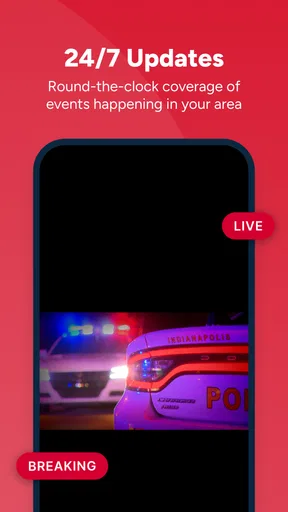
 Analysis by AppCompare
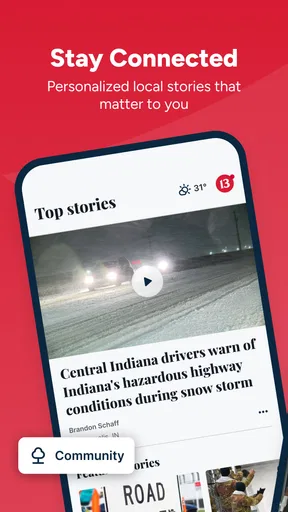
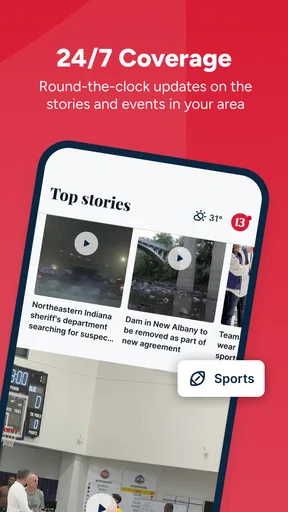
Indianapolis News from 13 WTHR is the kind of local news app I reach for when I want information tied to Indianapolis rather than a broad national feed. It comes from TEGNA and sits in the News & Magazines category, with a free download and an Everyone content rating. In everyday use, its appeal is straightforward: it brings local reporting, live video and weather into one mobile destination instead of making me jump between a general news service, a browser and a separate forecast app.
My overall impression is positive, but it depends heavily on how you use local news. If you care about what is happening around Indianapolis and want a quick way to check developing stories or weather, this app makes sense. If you mainly want national headlines, deep analysis or a perfectly uninterrupted news stream, a larger news platform may suit you better. The local focus is its strength, while the same focus can feel limiting when I am looking for a wider view.
How the Indianapolis focus changes the experience
The app’s short description identifies it simply as Indianapolis News, and that narrow identity matters. I do not open it expecting a complete replacement for every news source on my phone. I open it when location is more important than breadth: during a storm, after a major local incident, while following a city decision, or when I want to understand a story affecting people nearby.
That local emphasis is more useful than it may sound. General news apps often make me filter through national stories before finding something relevant to my day. Here, the starting point is more naturally connected to Indianapolis. The result is a quicker path from opening the app to answering practical questions such as whether weather is changing, whether a local situation is developing, or whether a story has moved beyond an initial report.
TEGNA has been behind the app since its release on March 29, 2012, and the current version is 50.23.2. Those details suggest a product that has had a long time to evolve rather than a brand-new experiment. It supports Android 7.1 and later, which makes it accessible to people who keep an older phone. I would still judge the experience on the device and connection I actually use, because an app’s age range does not guarantee that every phone feels equally quick.
The audience size also gives me some context without deciding the app’s value for me. It has passed one hundred thousand installs, with an average rating of 3.3 from around four thousand ratings and roughly one thousand reviews. That is a mixed reception rather than an automatic endorsement. I read it as a reason to try the app for myself, especially if local coverage is important, instead of assuming that the rating alone tells the whole story.
When a connection makes the app most useful
The strongest moments are the ones in which information is changing. Live video is more valuable during a developing local story than when I am casually browsing yesterday’s headlines. Weather is similarly connection-sensitive: a forecast is most helpful when I am deciding whether to leave now, change a commute or prepare for conditions later in the day.
Worth Reading Before You Choose

EA SPORTS FC Mobile 26 Is a Bigger Football Game, but It Takes Time

Flipboard Shows What News Apps Must Do Beyond the Feed

Switching to Android Auto Means Rethinking Your Driving Routine

Google Calendar Makes a Crowded Week Easier to Manage

Ludo King Makes the Most of the Minutes Between Plans

Baby Panda World Brings Quick Play to Modern Phones, but Its Game Library Feels Busy
One realistic routine is checking the app before leaving for work or school. I can look for a local headline, glance at the weather and decide whether I need extra travel time or different clothing. The benefit is not that the app makes the decision for me; it reduces the number of places I need to consult. For an Indianapolis resident, that small reduction in friction can make the app more useful than a polished national news reader with little local relevance.
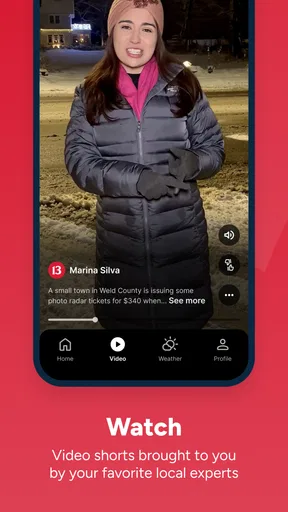
Another useful situation is following a story while away from a television. If a live video is available, the phone becomes a more immediate way to stay connected than waiting for a later article or broadcast. I find this especially relevant when I am already moving around the city and cannot sit down for a full news program. The trade-off is obvious: live viewing needs a reliable connection and can be less comfortable on a small screen than watching at home.
The app works best as a local awareness tool, not as my only source for every kind of information. I would pair it with a broader news service if I needed national politics, international reporting, specialist coverage or long-form context. That combination gives the Indianapolis app room to do what it does best without forcing it into a role it was not designed to fill.
Using it in short mobile sessions
I like local news apps most when they respect the way people actually use phones: in brief visits. I may have only a minute while waiting for a bus, standing in a queue or deciding whether to leave the house. A focused regional app can be more practical in those moments than a large feed packed with unrelated stories.
For a quick check, I would start with the most time-sensitive information rather than trying to read everything. Weather and developing local reports deserve attention first because they can affect plans immediately. If a headline matters, I can then spend more time with it. This order is a useful habit because it prevents a short visit from turning into aimless scrolling.
The mobile format is also useful for sharing awareness within a household. If a local event affects a partner, family member or neighbor, I can use the app as a prompt for a conversation and then verify the details in the relevant report. I would not treat a headline as the complete story, particularly when a situation is unfolding. Local news can change quickly, and the first version of an item may not answer every practical question.
There is a trade-off between convenience and screen size. Live video and news reading are easy to start on a phone, but a larger display is better for extended viewing or comparing details. I would use Indianapolis News from 13 WTHR for quick access and immediate awareness, then move to a larger screen when I want to watch for a long period or study a complicated story.
The minimum operating system of Android 7.1 is helpful for people with older hardware, but I would still keep expectations realistic. Older phones may open current apps less smoothly than newer models, particularly when handling video or switching between network-heavy content. That is not a reason to dismiss the app, but it is a reason to test it during the situations that matter most to me rather than judging it from a single brief launch.
What happens when the network is unreliable
Connectivity is central to this app’s usefulness. News, live video and weather are all time-sensitive, so a weak signal can change the experience from immediate to frustrating. I am careful not to confuse the presence of a news interface with guaranteed access in every location. When reception is poor, the practical value of any current-information app can drop sharply.
My preferred approach is to check important information before entering a place where service may be inconsistent. If I am preparing for a trip across the city or expecting severe weather, I would look at the latest available local information while connected rather than waiting until the moment I need it. This is not a claim that the app provides offline access; it is simply a sensible habit for any connection-dependent news workflow.
If a video stalls, I would switch to reading available written information instead of repeatedly restarting playback. That saves time and may use less data. If the app does not immediately show what I need, I would close and reopen it once, confirm that the phone still has a connection and then try again. Repeating the same action over a weak network rarely improves the result.
Recovery matters because local news is often consumed under pressure. During a storm or a major incident, I do not want to spend several minutes troubleshooting. I keep a second way to receive essential alerts or information, such as another trusted news source or a direct local authority channel. That backup is not a criticism unique to this app; it is a sensible safeguard whenever a phone connection may fail at the exact moment news matters most.
There is also a difference between an app failing and information simply taking time to update. A developing story may not have every detail immediately. I prefer to treat early reports as a starting point, watch for updates and avoid making serious decisions from one headline alone. This is one of the most important habits for using a local news app responsibly.
Keeping data use under control
Video is the feature I would watch most closely when managing mobile data. Live viewing can be valuable, but it is more demanding than reading a short article or checking a weather panel. If I am away from Wi-Fi and only need a quick update, I would prioritize text and weather information before opening live video.
A practical routine is to use the app freely on a home or workplace connection for longer viewing, then reserve mobile data for urgent checks. I would also avoid leaving a live stream running after I have received the information I needed. That sounds obvious, but it is an easy way to consume more data than intended when the phone is in a pocket or resting on a desk.
I would not assume that every part of the app has the same data impact. A quick headline check and a live video session are very different activities, even though they happen inside the same product. Thinking in those terms helps me choose the right tool within the app: use the lightest format that answers the question, and save richer media for when it is genuinely useful.
This approach also improves battery awareness. Network activity and video can be more demanding than a short text visit, so I would avoid relying on a long live session when my phone is already low on power. If I am traveling, I prefer to preserve battery for navigation and communication while using the app for targeted local checks.
For people with generous data plans, this may be less of a concern. Even so, the habit remains useful because it makes the experience more deliberate. I am less likely to open a stream automatically when a headline or forecast is enough. That balance is one of the app’s practical trade-offs: its live component adds immediacy, but immediacy is not always worth the extra network demand.
Who should choose it, and who should look elsewhere
I would recommend this app to Indianapolis residents, people commuting through the area and anyone who wants local news and weather in one focused place. It is also a reasonable choice for someone who prefers a regional source over an algorithmic national feed. The free price removes the main barrier to trying it, and the Everyone rating makes it suitable for a broad household audience.
I would be more hesitant to recommend it as a single news app for readers whose interests extend well beyond Indianapolis. Someone who wants international reporting, extensive business coverage, specialist publications or a large archive of analysis will probably be happier with a broader service. Likewise, a person who rarely follows local events may find the regional focus too narrow.
The comparison with a general news aggregator is revealing. An aggregator usually wins on variety and personalization, but it can bury local information beneath popular national stories. This app wins when speed to relevant Indianapolis coverage matters more than having everything in one giant feed. A dedicated weather app may still be better for detailed forecasting tools, while a television or web experience may be more comfortable for long live viewing.
I also would not choose it solely because it has been available for many years or because it has a substantial install base. Those facts show familiarity, not a guarantee that every user will enjoy the current experience. The 3.3 average rating is a reminder to keep expectations balanced. My advice is to test it during a normal morning, a weather check and a developing story before deciding whether it deserves a permanent place on the phone.
My connectivity verdict
After looking at the app through the situations in which I would actually use it, I see Indianapolis News from 13 WTHR as a practical local companion rather than an all-purpose news replacement. Its value rises when I have a stable connection and need timely Indianapolis information, especially weather or live coverage. Its value falls when reception is weak, mobile data is limited or I am searching for broad national and international depth.
The smartest way to use it is selective: check local headlines and weather during short visits, choose text when a quick answer is enough, and use live video when immediacy genuinely adds something. I would keep a backup source for urgent situations and avoid assuming that a connection will always be available. Those habits make the app more dependable in real life without pretending that network limitations do not exist.
For a free News & Magazines app from TEGNA with an Everyone rating and support for Android 7.1 or later, it offers a clear reason to exist: putting Indianapolis first. I would install it if local relevance is a daily need and give it a fair trial on my own phone and network. I would skip it if I want one service to cover the entire world or if live, connection-dependent content is not part of my routine.
Pros
- Fast access to breaking news across Indianapolis and central Indiana.
- Reliable local weather forecasts
- radar
- and severe weather alerts.
- Live newscasts and video reports make major stories easy to follow.
- Covers local traffic
- sports
- investigations
- and community events.
- Push notifications can keep users informed about urgent developments.
Cons
- Frequent alerts may feel excessive unless notification settings are adjusted.
- Some video reports may require a stable connection and use significant data.
- Advertising can interrupt browsing and make some pages feel cluttered.
- Coverage is focused on Indiana
- so it has limited value outside the region.
- Certain stories may load slowly during major breaking-news events.
FAQs for Indianapolis News from 13 WTHR
What is Indianapolis News from 13 WTHR?
Indianapolis News from 13 WTHR is a local news app focused on Indianapolis and communities across central Indiana. It provides access to breaking news, weather forecasts, traffic updates, sports coverage, investigative reports, videos, and other stories from the 13News team. The app is designed for readers who want local information in one convenient mobile experience.
What type of content can I find in the 13 WTHR app?
The app typically includes local and national news, Indiana politics, crime reports, community stories, business coverage, entertainment, sports, and health information. Users can also find live or recorded video reports, weather radar, hourly forecasts, severe-weather information, and traffic updates. Available sections and features may vary depending on location, breaking events, and app updates.
Does Indianapolis News from 13 WTHR provide live weather and severe-weather alerts?
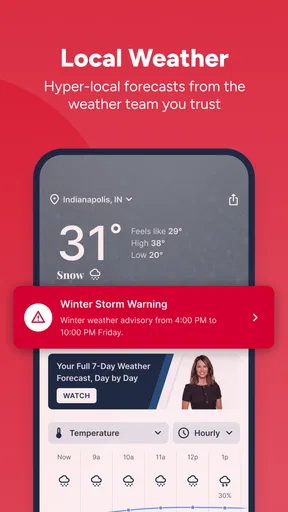
Yes, weather is one of the app’s main features. Users can generally check current conditions, hourly and extended forecasts, radar imagery, and severe-weather coverage from the 13News meteorology team. Alert availability may depend on notification permissions, device settings, and the user’s selected location, so enabling notifications is recommended if timely warnings are important.
Is the Indianapolis News from 13 WTHR app free to download?
The app is generally available to download at no direct cost, allowing users to browse news, weather, videos, and other core content. However, it may contain advertising, sponsored material, or links to external services. Mobile data charges can also apply when streaming video or using the app over cellular networks, depending on your carrier and plan.
Does the app require an account, and can I customize notifications?
Many of the app’s basic news and weather features can usually be accessed without creating an account. Users may be able to choose which notifications they receive, such as breaking news, weather warnings, school closings, or local updates. Notification options can change over time, and permissions must be enabled in both the app and the device’s operating-system settings.


